# React SSR
# 基本概念
# 为什么需要 SSR
单页面富应用的局限:
- 之前我们开发的应用程序,如果直接请求可以看到上面几乎没有什么内容。
- 但是为什么我们页面可以看到大量的内容呢?
因为当我们请求下来静态资源之后会执行 JS , JS 会去请求数据,并且渲染我们想要看到的。
但是这个过程存在另外两个问题:
- 首屏显示的速度较慢;
- 不利于 SEO 的优化;
# 认识 SSR 与 同构
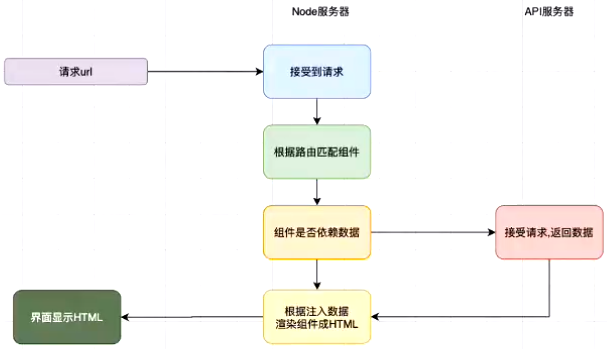
SSR
SSR (Server Side Rendering 服务端渲染),指的是页面在服务器端已经生成了完成的 HTML 页面结构,不需要浏览器解析。 对应的是 CSR ( Client Side Rendering 客户端渲染) , 我们开发的 SPA 页面通常依赖的就是客户端渲染。 早期的服务端渲染包括 PHP、JSP、 ASP 等方式,但是在目前前后端分离的开发模式下,前端开发人员不太可能再去学习 PHP、JSP 等技术来开发网页。 不过我们可以借助于 Node 来帮助我们执行 JavaScript 代码,提前完成页面的渲染。
同构
一套代码既可以在服务端运行又可以在客户端运行,这就是同构应用。 同构是一种 SSR 的形态,是现代 SSR 的一种表现形式。 当用户发出请求时,先在服务器通过 SSR 渲染出首页的内容。 但是对应的代码同样可以在客户端被执行。 执行的目的包括事件绑定等以及其他页面切换时也可以在客户端被渲染
# 脚手架
Next.js 是比较成熟的 SSR 框架
# 安装
npm: npm install create-next-app -g
# 创建项目
create-next-app 项目名
# 启动项目
npm run dev
# 页面跳转
# 前端渲染跳转
import Link from "next/link";

<Link href="/路径">
  <a>内容</a>
</Link>;
# 后端渲染跳转
<a href="/路径"></a>
# 保留页面公共部分
# _app.js
/page/app.js
import "../styles/globals.css";
import Head from "next/head";
import Link from "next/link";

function MyApp({ Component, pageProps }) {
  return (
    <div>
      <header>
        <Head>
          <title>网页标题</title>
        </Head>
        <p>页首</p>
      </header>
      <Component {...pageProps} />
      <footer>
        <p>页尾</p>
      </footer>
    </div>
  );
}

export default MyApp;
# 自定义 Layout
- 定义 Layout
/app-layout.js
import React, { memo } from "react";
import Head from "next/head";
import Link from "next/link";

export default memo(function AppLayout(props) {
  return (
    <div>
      <header>
        <Head>
          <title>网页标题</title>
        </Head>
        <p>页首</p>
      </header>
      {props.children}
      <footer>
        <p>页尾</p>
      </footer>
    </div>
  );
});
- 使用
import React, { memo } from "react";
import AppLayout from "@/components/app-layout";

export default memo(function About() {
  return (
    <AppLayout>
      <h2>页面</h2>
    </AppLayout>
  );
});
# CSS
# 普通 CSS
\style.css
.组件名 .类名 {
  color: red;
}
import React, { memo } from "react";
import "./style.css";

export default memo(function 组件名() {
  render() {
    return (
      <div className="组件名">
        <h2 className="类名">内容</h2>
      </div>
    );
  }
}
# CSS Modules
新建 \CSS 名称.module.css
.类名 {
  属性: 值;
}
使用:
import React, { memo } from "react";
import styles from "../styles/Home.module.css";

export default memo(function 组件名() {
  return (
    <div>
      <h1 className={styles.类名}>内容</h1>
    </div>
  );
});
# CSS in JS
- styled-jxs
提示
Next.js 默认集成 styled-jxs
import React, { memo } from "react";

const 组件名 = memo(function (props) {
  return (
    <div>
      <style>{`
        p {
          color: blue;
          text-decoration: underline;
        }
      `}</style>
    </div>
  );
})
- styled-components
提示
styled-components 默认为服务端渲染,需要配置babel-plugin-styled-components
安装
npm: npm install styled-components --save
npm: npm install babel-plugin-styled-components -d
配置
创建 /.babelrc
{
  "presets": ["next/babel"],
  "plugins": [["styled-components"]]
}
使用
新建 \style.js
import styled from "styled-components";

export const Wrapper = styled.div`
  /* CSS样式(支持嵌套样式) */
`;

export const 样式名 = styled.div`
  /* CSS样式(支持嵌套样式) */
`;
\index.js
import React, { PureComponent } from "react";
import { Wrapper, 样式名 } from "./style";

class App extends PureComponent {
  render() {
    return (
      <Wrapper>
        <样式名>
          <h2>标题</h2>
        </样式名>
      </Wrapper>
    );
  }
}

export default App;
# 路由
# 默认路由
Next.js 默认已经给我们配置好了路由映射关系。pages 目录相关的组件会自动生成对应的路径
\pages\组件名.js
import React, { memo } from "react";

export default memo(function 组件名() {
  return (
    <div>
      <h2>组件名</h2>
    </div>
  );
});
访问:127.0.0.1:3000/组件名
# 二级路由
- 定义 Layout
/layout/index.js
import React, { memo } from "react";
import Link from "next/link";

export default memo(function Layout(props) {
  return (
    <div>
      <Link href="/路径">
        <a>标题</a>
      </Link>
      <Link href="/路径">
        <a>标题</a>
      </Link>
      {props.children}
    </div>
  );
});
- 使用
import React, { memo } from "react";
import Layout from "../layout";

export default memo(function 组件名() {
  return (
    <Layout>
      <h2>组件名</h2>
    </Layout>
  );
});
# 路由传参
- 普通方式
传递参数:
import Link from "next/link";

<Link href="/路径?参数名=值">
  <a>内容</a>
</Link>;
接收参数:
import React, { memo } from "react";
import { useRouter } from "next/router";

export default memo(function 组件名() {
  const router = useRouter();

  return (
    <div>
      <h2>参数: {router.query.参数名}</h2>
    </div>
  );
});
- 代码跳转
传递参数:
import React, { memo } from 'react'
import Router from "next/router";

export default memo(function 组件名() {
  const 事件名 = (item) => {
    Router.push({
      pathname: "/路径",
      query: {
        参数名: 值,
      },
    });
  };

  return (
    <div>
      <button onClick={(e) => 事件名()}></button>
    </div>
  );
}
接收参数:
import React, { memo } from "react";
import { useRouter } from "next/router";

export default memo(function 组件名() {
  const router = useRouter();

  return (
    <div>
      <h2>参数: {router.query.参数名}</h2>
    </div>
  );
});
# 网络请求
import React, { memo } from "react";
import axios from "axios";

const 组件名 = memo(function (props) {
  const { 参数名 } = props;

  return (
    <div>
      <h2>参数: {参数名}</h2>
    </div>
  );
};

组件名.getInitialProps = async (props) => {
  const res = await axios({
    url: "地址",
  });

  return {
    参数名: res.data
  };
});

export default 组件名;